Heavy-Duty Diagnostic Adapters: Compare by Task
Evaluate an adapter by vehicle network, software support, cables, programming requirements and lifecycle rather than blanket brand claims.
Separate interface and application
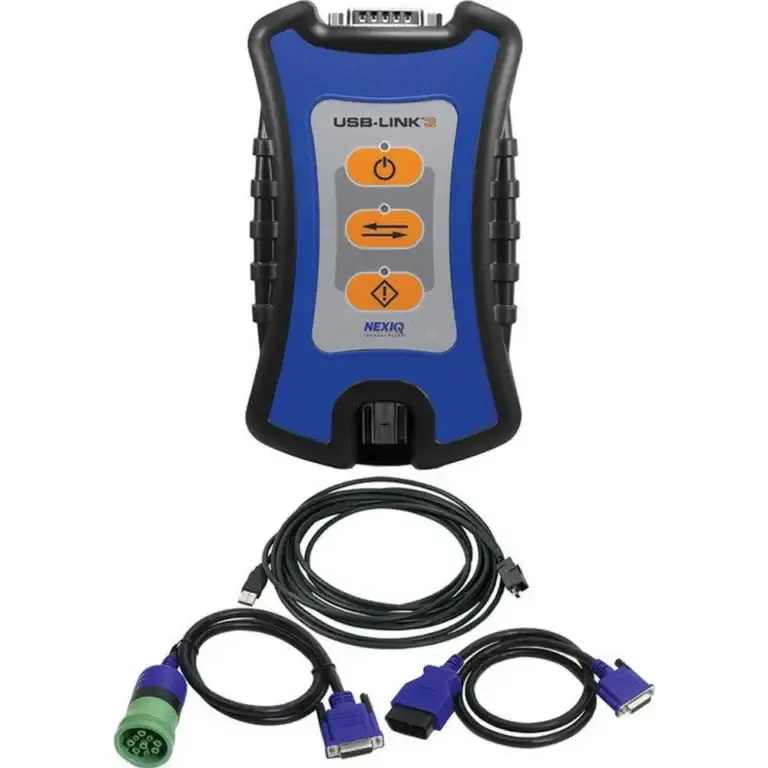
An interface transports communication between the computer and supported vehicle systems. The application, license and vehicle determine available diagnostic and programming functions. Avoid calling one brand a code reader only, a single-engine-only tool or universally programming-capable without configuration-specific evidence. NEXIQ: USB-Link 3 Wired 121054 specifications and package
Use a consistent comparison matrix
| Field | What to record for each candidate |
|---|---|
| Hardware | Exact model, revision, wired/wireless connection and included cables. |
| Vehicle coverage | Engine/chassis years, protocols and required connector. |
| Software | Supported application/version, driver and license edition. |
| Task | Code reading, live data, active test, parameter change or flash. |
| Support | Current driver availability, software lifecycle and warranty provider. |
| Cost | Quoted hardware plus required cables, licenses and renewals. |
Check current support before buying legacy hardware
Manufacturer notices can change the suitability of an older adapter for a new workstation. Check the current Noregon DLA+ 2.0 notice and the selected application’s requirements rather than using an old price/feature table.
Programming needs a specific compatibility decision
Consult the manufacturer connection instructions and OEM permissions for the actual write operation. Do not infer programming reliability from protocol support alone. Noregon’s adapter manual distinguishes reprogramming connection modes. Noregon: DLA+ 2.0 adapter family manual Cummins also documents calibration approval checks. Cummins: calibration download approval changes
Make a task-based purchase
Ask for the evidence supporting your vehicle and workload. Torque Edge sells equipment and can quote a configuration, so this guide has a commercial interest. For a focused two-brand discussion, see NEXIQ versus Noregon; for the complete workstation, see laptop setup.
Sources and scope
References describe the applications and editions named in each document. For work on a truck, select current service information by engine serial number, reporting controller and calibration. A general guide does not replace those procedures.
- NEXIQ: USB-Link 3 Wired 121054 specifications and package
- Noregon: DLA+ 2.0 support notice
- Noregon: DLA+ 2.0 adapter family manual
- Cummins: calibration download approval changes
Remote diagnostics · 24/7 · Hablamos Español
Start a remote diagnostic session
For a remote session, a compatible adapter such as Nexiq USB-Link 3 and a diagnostic laptop must be connected at the vehicle. Contact Torque Edge to confirm equipment, software and availability for your engine.
or request a callback
Need the hardware in your shop? Nexiq USB-Link 3 · Diagnostic laptop